- Log into the ESR portal (https://my.esr.nhs.uk/) – click here for help with logging in.
- Click the ‘burger’ menu at the top of the page outlined in red below.
- Click My Personal Information
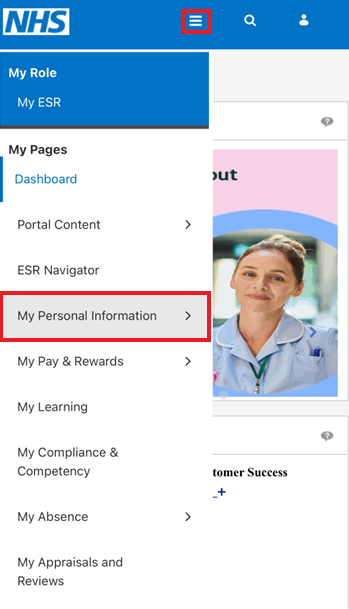
Here you will find all the options for information you can update.
Please be aware only the following sections should be updated:
- Personal Information (address, phone, email, ethnic origin, marital status, gender)
- Contacts (next of kin)
- Sexual Orientation
- Religious Belief
- Socio-economic Background
- Disability Information
Please be advised that updating any other sections will not update your NHS Professionals profile
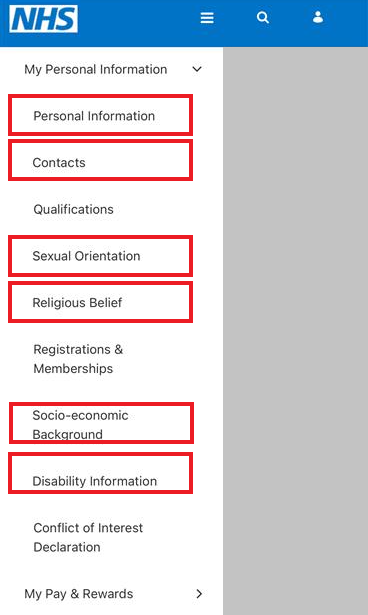
- To update the information, click each section. On the subsequent pages, you will see options to Update your information.
Further guidance on how to update your address can be found here.
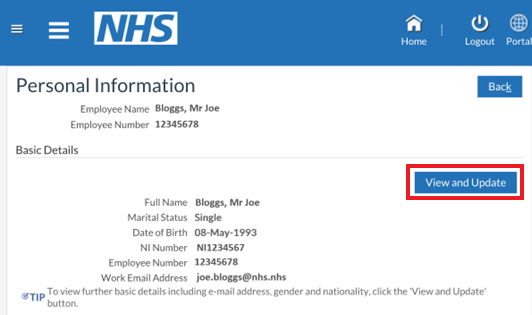
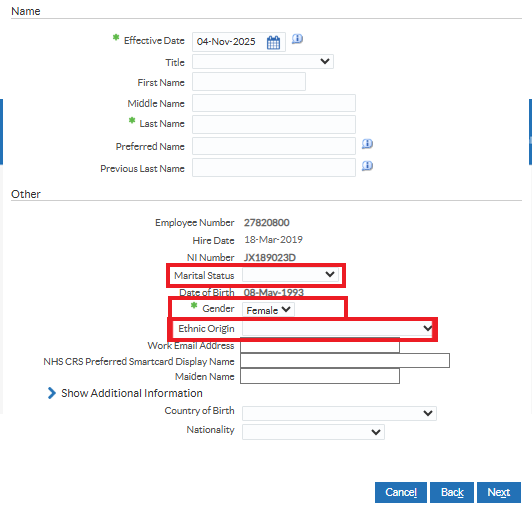
IMPORTANT: Please be aware that Marital Status, Ethnic Origin and Gender can all be found by clicking on Personal Information then in the Basic Details section, click View and Update.
- Click Enter new information and Next

- You will see the following fields to be completed.
- Once completed, click Next.
Important Note: Please allow 48 hours for any changes to your personal details to reflect in My:Bank.